Sidebar Component
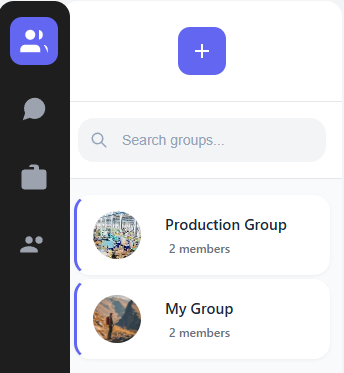
The Sidebar is the heart of navigation built for this app. It handles chat navigation, search functionality, and displaying the user's conversation list.
What It Does
The Sidebar component is your entry point into the chat experience. It's responsible for:
- Displaying all your active conversations
- Showing unread message counts
- Letting you search for users and chats
- Creating new conversations and groups
- Showing your profile info and settings
How I Built It
I structured the Sidebar as a container component with several child components:
// src/components/sidebar/Sidebar.jsx
import { useState, useEffect, useRef, useCallback } from 'react';
import { useAuth } from '../../contexts/AuthContext';
import { useChat } from '../../contexts/ChatContext';
import styles from './Sidebar.module.css';
import UserProfile from './UserProfile';
import ChatList from './ChatList';
import SearchBar from './SearchBar';
import NewChatButton from './NewChatButton';
import NewGroupButton from './NewGroupButton';
import CreateGroupModal from '../modals/CreateGroupModal';

export default function Sidebar() {
  // State variables
  const [searchQuery, setSearchQuery] = useState('');
  const [showCreateGroup, setShowCreateGroup] = useState(false);
  const [filteredChats, setFilteredChats] = useState([]);

  // Get context data
  const { chats, loading, allUsers } = useChat();
  const { user } = useAuth();

  // Filter chats based on search query
  useEffect(() => {
    if (!chats || chats.length === 0) {
      setFilteredChats([]);
      return;
    }

    // If search query is empty, show all chats
    if (!searchQuery.trim()) {
      setFilteredChats(chats);
      return;
    }

    // Filter chats based on chat name or last message
    const filtered = chats.filter(chat => {
      // Make sure chat.name exists before calling toLowerCase()
      const chatName = chat.name || '';
      return chatName.toLowerCase().includes(searchQuery.toLowerCase()) ||
        (chat.lastMessage?.content || '').toLowerCase().includes(searchQuery.toLowerCase());
    });

    setFilteredChats(filtered);
  }, [chats, searchQuery]);

  return (
    <div className={styles.sidebar}>
      <UserProfile user={user} />

      <div className={styles.searchContainer}>
        <SearchBar
          value={searchQuery}
          onChange={(e) => setSearchQuery(e.target.value)}
          placeholder="Search chats..."
        />
      </div>

      <div className={styles.actions}>
        <NewChatButton />
        <NewGroupButton onClick={() => setShowCreateGroup(true)} />
      </div>

      <ChatList chats={filteredChats} loading={loading} />

      {showCreateGroup && (
        <CreateGroupModal
          onClose={() => setShowCreateGroup(false)}
          allUsers={allUsers}
        />
      )}
    </div>
  );
}
The Chat Filtering Logic
One tricky part was handling the chat filtering. I ran into a bug where some chat objects didn't have a name property, which caused errors when calling toLowerCase(). I fixed this by adding a fallback:
// Before (problematic):
const filtered = chats.filter(chat =>
  chat.name.toLowerCase().includes(searchQuery.toLowerCase())
);

// After (fixed):
const filtered = chats.filter(chat => {
  const chatName = chat.name || '';
  return chatName.toLowerCase().includes(searchQuery.toLowerCase());
});
This ensures that even if a chat doesn't have a name property (which can happen with new chats or during data loading), the app won't crash.
The Chat List Component
The ChatList component renders each individual chat item:
function ChatList({ chats, loading }) {
  if (loading) {
    return <div className={styles.loading}>Loading chats...</div>;
  }

  if (!chats || chats.length === 0) {
    return <div className={styles.noChats}>No chats found. Start a new conversation!</div>;
  }

  return (
    <div className={styles.chatList}>
      {chats.map(chat => (
        <ChatItem
          key={chat.id}
          chat={chat}
        />
      ))}
    </div>
  );
}
User Experience Considerations
I added several UX enhancements to make the sidebar more user-friendly:
- Loading States: I show a loading indicator while chats are being fetched
- Empty States: A friendly message when the user has no chats
- Unread Indicators: Visual badges showing the number of unread messages
- Online Status: Green dots to show which users are currently online
- Last Message Previews: Truncated preview of the last message in each chat
Future Improvements
If I were to improve this component further, I'd consider:
- Adding the ability to pin favorite chats
- Implementing chat folders or categories
- Adding chat archiving functionality