Auth Components
I spent quite a bit of time designing the authentication flow for this chat app. Getting auth right is crucial - it needs to be secure but also user-friendly. Here's how I structured the authentication components.
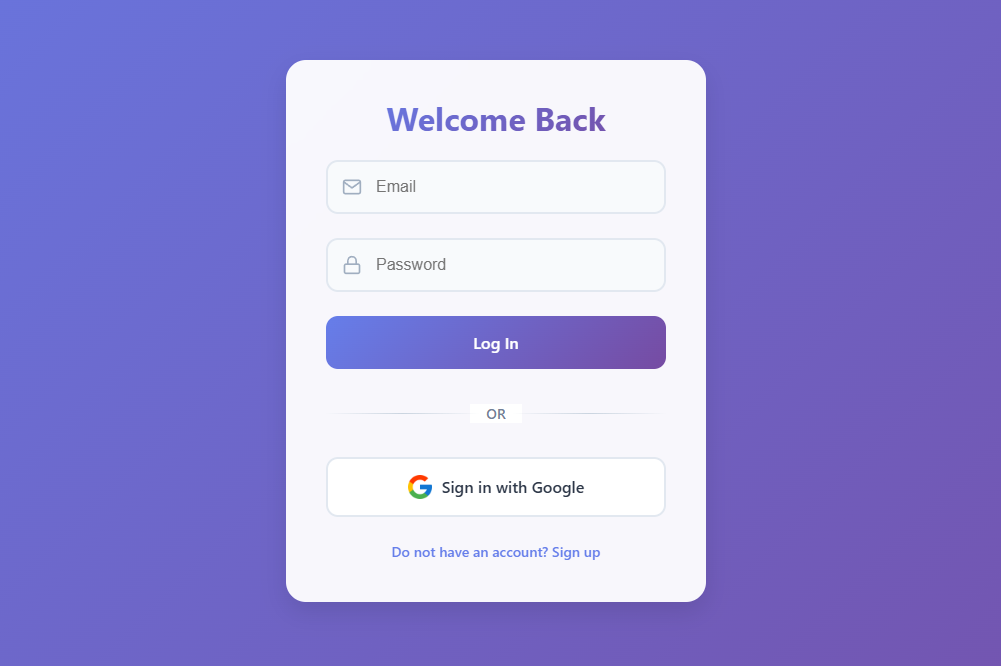
Login Component
The Login component is the entry point for returning users. I kept it clean and simple:
// src/components/auth/Login.jsx
import { useState } from 'react';
import { useAuth } from '../../contexts/AuthContext';
import { Link, useNavigate } from 'react-router-dom';
import styles from './Auth.module.css';
import GoogleButton from './GoogleButton';

export default function Login() {
  // State variables
  const [email, setEmail] = useState('');
  const [password, setPassword] = useState('');
  const [error, setError] = useState('');
  const [loading, setLoading] = useState(false);

  // Get auth context and navigation
  const { login } = useAuth();
  const navigate = useNavigate();

  // Handle form submission
  const handleSubmit = async (e) => {
    e.preventDefault();

    try {
      setError('');
      setLoading(true);
      await login(email, password);
      navigate('/'); // Redirect to chat on success
    } catch (error) {
      setError(getErrorMessage(error.code));
    } finally {
      setLoading(false);
    }
  };

  // Helper function to get user-friendly error messages
  const getErrorMessage = (errorCode) => {
    switch (errorCode) {
      case 'auth/wrong-password':
        return 'Incorrect password. Please try again.';
      case 'auth/user-not-found':
        return 'No account found with this email.';
      case 'auth/too-many-requests':
        return 'Too many failed login attempts. Please try again later.';
      default:
        return 'Failed to log in. Please check your credentials.';
    }
  };

  return (
    <div className={styles.authContainer}>
      <h2>Welcome Back</h2>

      {error && <div className={styles.error}>{error}</div>}

      <form onSubmit={handleSubmit} className={styles.authForm}>
        <div className={styles.formGroup}>
          <label htmlFor="email">Email</label>
          <input
            type="email"
            id="email"
            value={email}
            onChange={(e) => setEmail(e.target.value)}
            required
          />
        </div>

        <div className={styles.formGroup}>
          <label htmlFor="password">Password</label>
          <input
            type="password"
            id="password"
            value={password}
            onChange={(e) => setPassword(e.target.value)}
            required
          />
        </div>

        <button
          type="submit"
          className={styles.submitButton}
          disabled={loading}
        >
          {loading ? 'Logging in...' : 'Log In'}
        </button>
      </form>

      <div className={styles.divider}>or</div>

      <GoogleButton />

      <p className={styles.authLink}>
        <Link to="/forgot-password">Forgot password?</Link>
      </p>

      <p className={styles.authLink}>
        Don't have an account? <Link to="/signup">Sign Up</Link>
      </p>
    </div>
  );
}
Signup Component
For new users, I created a straightforward signup flow:
// src/components/auth/Signup.jsx
import { useState } from 'react';
import { useAuth } from '../../contexts/AuthContext';
import { Link, useNavigate } from 'react-router-dom';
import styles from './Auth.module.css';
import GoogleButton from './GoogleButton';

export default function Signup() {
  const [displayName, setDisplayName] = useState('');
  const [email, setEmail] = useState('');
  const [password, setPassword] = useState('');
  const [confirmPassword, setConfirmPassword] = useState('');
  const [error, setError] = useState('');
  const [loading, setLoading] = useState(false);

  const { signup } = useAuth();
  const navigate = useNavigate();

  const handleSubmit = async (e) => {
    e.preventDefault();

    // Password validation
    if (password !== confirmPassword) {
      return setError('Passwords do not match');
    }

    if (password.length < 6) {
      return setError('Password must be at least 6 characters');
    }

    try {
      setError('');
      setLoading(true);
      await signup(email, password, displayName);
      navigate('/');
    } catch (error) {
      if (error.code === 'auth/email-already-in-use') {
        setError('An account with this email already exists');
      } else {
        setError('Failed to create an account');
      }
    } finally {
      setLoading(false);
    }
  };

  return (
    <div className={styles.authContainer}>
      <h2>Create Account</h2>

      {error && <div className={styles.error}>{error}</div>}

      <form onSubmit={handleSubmit} className={styles.authForm}>
        <div className={styles.formGroup}>
          <label htmlFor="displayName">Display Name</label>
          <input
            type="text"
            id="displayName"
            value={displayName}
            onChange={(e) => setDisplayName(e.target.value)}
            required
          />
        </div>

        <div className={styles.formGroup}>
          <label htmlFor="email">Email</label>
          <input
            type="email"
            id="email"
            value={email}
            onChange={(e) => setEmail(e.target.value)}
            required
          />
        </div>

        {/* Password fields and submit button */}
        {/* ... */}
      </form>

      <div className={styles.divider}>or</div>

      <GoogleButton />

      <p className={styles.authLink}>
        Already have an account? <Link to="/login">Log In</Link>
      </p>
    </div>
  );
}
ForgotPassword Component
I made sure users could recover their accounts easily:
function ForgotPassword() {
  const [email, setEmail] = useState('');
  const [message, setMessage] = useState('');
  const [error, setError] = useState('');
  const [loading, setLoading] = useState(false);

  const { resetPassword } = useAuth();

  const handleSubmit = async (e) => {
    e.preventDefault();

    try {
      setMessage('');
      setError('');
      setLoading(true);
      await resetPassword(email);
      setMessage('Check your inbox for password reset instructions');
    } catch (error) {
      setError('Failed to reset password. Is the email correct?');
    } finally {
      setLoading(false);
    }
  };

  // Component rendering
  // ...
}
ProfileUpdate Component
Users can update their profile info through this component:
function ProfileUpdate() {
  // State for form fields
  const [displayName, setDisplayName] = useState('');
  const [photoURL, setPhotoURL] = useState('');
  const [bio, setBio] = useState('');
  const [success, setSuccess] = useState('');

  const { user, updateUserProfile } = useAuth();

  // Pre-fill form with current user data
  useEffect(() => {
    if (user) {
      setDisplayName(user.displayName || '');
      setPhotoURL(user.photoURL || '');
      setBio(user.bio || '');
    }
  }, [user]);

  const handleSubmit = async (e) => {
    e.preventDefault();

    try {
      await updateUserProfile({
        displayName,
        photoURL,
        bio
      });
      setSuccess('Profile updated successfully!');

      // Hide success message after a delay
      setTimeout(() => setSuccess(''), 3000);
    } catch (error) {
      console.error('Error updating profile:', error);
    }
  };

  // Component rendering
  // ...
}
PrivateRoute Component
I created this to protect routes that require authentication:
// src/components/PrivateRoute.jsx
import { Navigate } from 'react-router-dom';
import { useAuth } from '../contexts/AuthContext';

export default function PrivateRoute({ children }) {
  const { user, loading } = useAuth();

  // Show loading indicator while auth state is being determined
  if (loading) {
    return <div className="loading">Loading...</div>;
  }

  // Redirect to login if not authenticated
  if (!user) {
    return <Navigate to="/login" />;
  }

  // If authenticated, render the protected route
  return children;
}
Technical Challenges
User Presence System
One tricky thing was setting up a reliable online presence system. I eventually solved it by combining Firebase auth state changes with database listeners:
// In AuthContext.jsx
useEffect(() => {
  const unsubscribe = onAuthStateChanged(auth, (currentUser) => {
    setUser(currentUser);
    setLoading(false);

    if (currentUser) {
      // Update user data in the database
      const userRef = ref(db, `users/${currentUser.uid}`);
      update(userRef, {
        lastSeen: serverTimestamp(),
        isOnline: true
      });

      // Set up a presence system
      onDisconnect(userRef).update({
        isOnline: false,
        lastSeen: serverTimestamp()
      });
    }
  });

  return () => unsubscribe();
}, []);
Google Authentication
I ran into a few issues with Google auth, especially with popup blockers. I had to make sure the Google sign-in was always triggered by a user interaction:
// src/components/auth/GoogleButton.jsx
import { useAuth } from '../../contexts/AuthContext';
import styles from './Auth.module.css';

export default function GoogleButton() {
  const { signInWithGoogle } = useAuth();
  const [error, setError] = useState('');

  const handleGoogleSignIn = async () => {
    try {
      setError('');
      await signInWithGoogle();
      // Redirect is handled in the AuthContext
    } catch (error) {
      console.error('Google sign-in error:', error);
      setError('Failed to sign in with Google');
    }
  };

  return (
    <>
      {error && <div className={styles.error}>{error}</div>}
      <button
        type="button"
        className={styles.googleButton}
        onClick={handleGoogleSignIn}
      >
        <img src="/img/google-logo.png" alt="Google" />
        Continue with Google
      </button>
    </>
  );
}
User Experience Considerations
I paid special attention to the auth flow UX:
- Helpful Error Messages: Clear, specific feedback for login/signup failures
- Loading States: Disabled buttons and loading indicators during auth operations
- Form Validation: Client-side validation before submitting to Firebase
- Redirects: Sensible redirects after successful operations
- Password Reset: Simple, easy-to-use password recovery process
Future Improvements
If I had more time, I would add:
- Multi-factor authentication
- Login with other providers (Facebook, Twitter, etc.)
- Account deletion functionality
- Email verification enforcement
- More robust password strength indicators