ChatArea Component
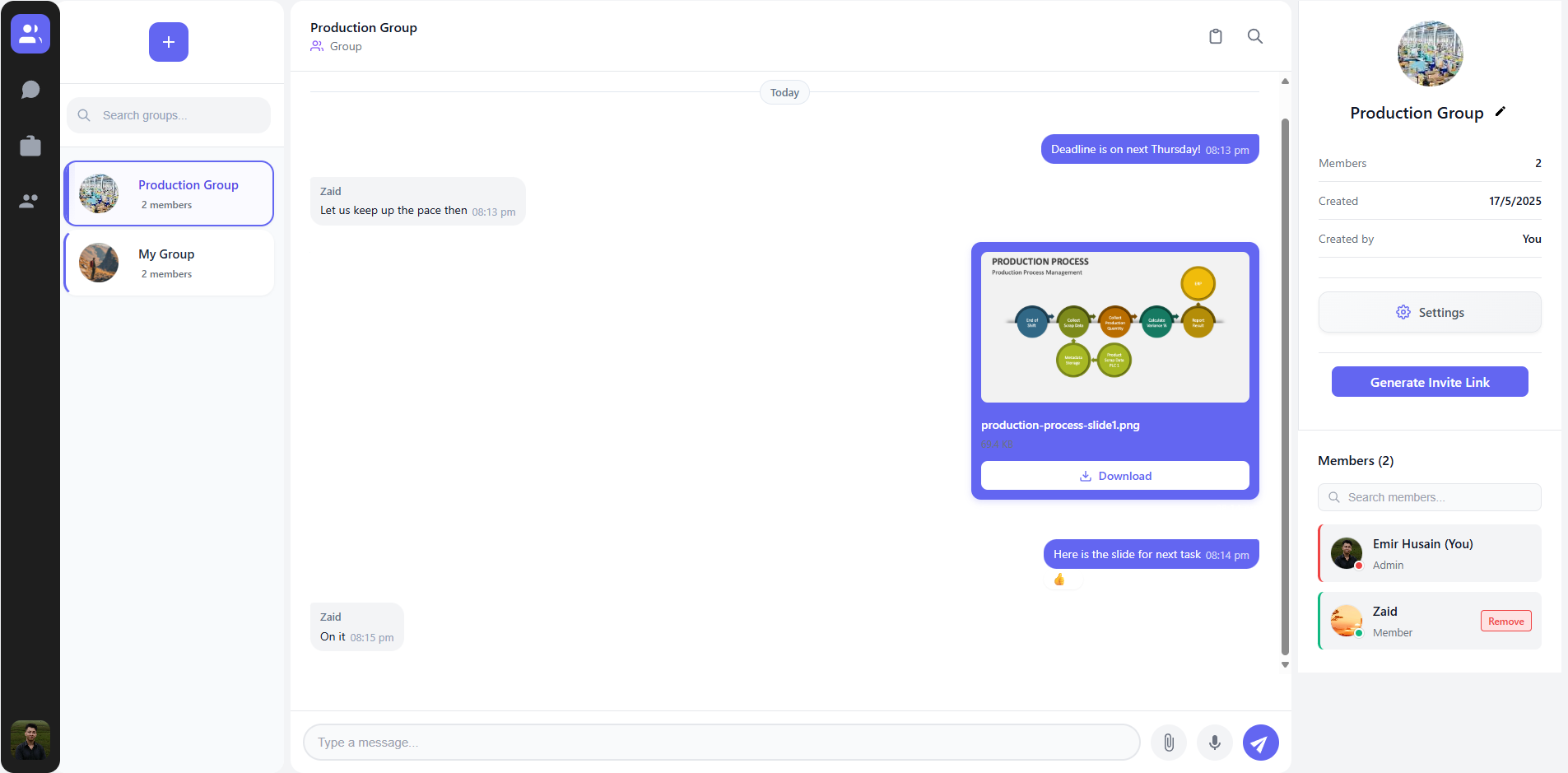
The ChatArea component is the central part of the chat application, responsible for displaying messages and providing the interface for sending messages.
Overview
The ChatArea component is a complex component that handles:
- Displaying messages in a scrollable container
- Sending text messages
- Uploading and sending files
- Recording and sending voice messages
- Message reactions
- Message editing and deletion
- Showing typing indicators
- User blocking UI elements
- Notifications for new messages
Component Structure
The ChatArea component is structured as follows:
// File: src/components/chat/ChatArea.jsx

import { useState, useRef, useEffect } from 'react';
import { useAuth } from '../../contexts/AuthContext';
import { useChat } from '../../contexts/ChatContext';
import styles from './ChatArea.module.css';
import React from 'react';
import ChatAreaSkeleton from './ChatAreaSkeleton';
import MessageReactions from './MessageReactions';
import MessageSearch from './MessageSearch';
import VoiceRecorder from './VoiceRecorder';
import AudioPlayer from './AudioPlayer';
import LogViewer from './LogViewer';
import { ref, get } from 'firebase/database';
import { db } from '../../config/firebase';

export default function ChatArea() {
  // Component state and logic
  // ...

  return (
    <div className={styles.chatArea}>
      {/* Header */}
      <div className={styles.header}>
        {/* ... */}
      </div>

      {/* Blocked banner (if applicable) */}
      {isOtherUserBlocked && (
        <div className={styles.blockedBanner}>
          {/* ... */}
        </div>
      )}

      {/* Message list */}
      <div className={styles.messageList} ref={messageListRef}>
        {/* Messages */}
        {/* ... */}
      </div>

      {/* Scroll button */}
      {renderScrollButton()}

      {/* Typing indicators */}
      <div className={styles.typingIndicatorContainer}>
        {renderTypingIndicators()}
      </div>

      {/* Message form */}
      <form onSubmit={handleSend} className={styles.messageForm}>
        {/* ... */}
      </form>

      {/* Additional panels */}
      {showSearchPanel && <MessageSearch /* ... */ />}
      {showLogViewer && <LogViewer /* ... */ />}
    </div>
  );
}
Props & Context
The ChatArea component doesn't receive any props directly but uses several context providers:
ChatContext
The component consumes the following from ChatContext:
const {
  currentChat,
  messages,
  sendMessage,
  sendFileMessage,
  sendVoiceMessage,
  fileUploads,
  handleVote,
  markChatAsRead,
  FILE_SIZE_LIMIT,
  ALLOWED_FILE_TYPES,
  typingUsers,
  setTypingStatus,
  loadMoreMessages,
  hasMoreMessages,
  loading,
  editMessage,
  deleteMessage,
  setMessages,
  isCurrentUserAdmin,
  isUserBlocked
} = useChat();
AuthContext
The component uses the authenticated user from AuthContext:
const { user } = useAuth();
Key State Variables
The component manages several pieces of internal state:
// Message input
const [newMessage, setNewMessage] = useState('');
const [fileUploadError, setFileUploadError] = useState('');

// UI states
const [showVoiceRecorder, setShowVoiceRecorder] = useState(false);
const [showScrollButton, setShowScrollButton] = useState(false);
const [buttonFading, setButtonFading] = useState(false);
const [newMessageReceived, setNewMessageReceived] = useState(false);

// Message loading states
const [isLoadingMore, setIsLoadingMore] = useState(false);
const [reachedTop, setReachedTop] = useState(false);
const [messagesLoading, setMessagesLoading] = useState(false);
const [isAtTop, setIsAtTop] = useState(false);

// Message editing states
const [editingMessage, setEditingMessage] = useState(null);
const [editingContent, setEditingContent] = useState('');
const [editError, setEditError] = useState('');
const [deleteConfirm, setDeleteConfirm] = useState(null);

// Reply functionality
const [replyingTo, setReplyingTo] = useState(null);

// User blocking
const [otherUserId, setOtherUserId] = useState(null);
const [isOtherUserBlocked, setIsOtherUserBlocked] = useState(false);
Key Functions
Message Sending
The component has several functions for sending different types of messages:
Text Messages
const handleSend = (e) => {
  e.preventDefault();
  if (!newMessage.trim() || !currentChat?.id) return;

  // Check if user is blocked
  // ...

  // Create optimistic message
  // ...

  // Send the message
  sendMessage(message, replyingTo?.id || null);

  // Clear the input
  setNewMessage('');

  // Clear typing status
  setTypingStatus(false);
};
File Messages
const handleFileUpload = async (e) => {
  const file = e.target.files[0];
  if (!file) return;

  // Validate file type and size
  // ...

  // Process and send the file
  await sendFileMessage(processedFile, progressCallback, replyingTo?.id || null);
};
Voice Messages
const handleSendVoice = async (audioBlob, duration) => {
  // Check if user is blocked
  // ...

  // Send the voice message
  await sendVoiceMessage(audioBlob, duration, replyingTo?.id || null);
};
Scrolling and Message Loading
The component includes functions for managing the message list scrolling:
// Load more messages when user scrolls to top
const handleLoadMore = () => {
  if (isLoadingMore || !loadMoreMessages || !isAtTop) return;

  setIsLoadingMore(true);
  loadMoreMessages(20).then((hasMore) => {
    // Update UI based on whether more messages exist
    // ...
  });
};

// Scroll to bottom of messages
const scrollToBottom = (smooth = true) => {
  if (!messageListRef.current) return;

  messageListRef.current.scrollTo({
    top: messageListRef.current.scrollHeight,
    behavior: smooth ? 'smooth' : 'auto'
  });
};
Message Editing
Functions for editing and deleting messages:
const handleStartEdit = (message) => {
  // Validate edit permissions
  // ...

  setEditingMessage(message);
  setEditingContent(message.content);
};

const handleSaveEdit = async () => {
  if (!editingMessage || !editingContent.trim()) return;

  await editMessage(editingMessage.id, editingContent.trim());
  setEditingMessage(null);
};

const handleDeleteMessage = async () => {
  if (!deleteConfirm) return;

  await deleteMessage(deleteConfirm.id);
  setDeleteConfirm(null);
};
User Blocking Integration
The component checks if the current user has blocked the other participant:
useEffect(() => {
  if (!otherUserId || !isUserBlocked) {
    setIsOtherUserBlocked(false);
    return;
  }

  const blocked = isUserBlocked(otherUserId);
  setIsOtherUserBlocked(blocked);
}, [otherUserId, isUserBlocked]);
If a user is blocked, the UI changes:
- A blocked banner is displayed
- The message input is disabled
- A different placeholder text is shown
Rendering Messages
Messages are rendered based on their type:
// Text messages
{!message.type && !message.deleted && (
  <div className={styles.bubble}>
    {message.content}
    {/* ... */}
  </div>
)}

// File messages
{message.type === 'file' && (
  <div className={styles.fileMessage}>
    {renderFilePreview(message)}
    {/* ... */}
  </div>
)}

// Voice messages
{message.type === 'voice' && (
  <div className={styles.voiceMessage}>
    {renderVoiceMessage(message)}
    {/* ... */}
  </div>
)}
CSS Modules
The component uses CSS Modules for styling:
import styles from './ChatArea.module.css';
This approach ensures style encapsulation, preventing conflicts with other components.
Error Handling
The component includes various error handling mechanisms:
try {
  // Component logic
} catch (error) {
  console.error('Error:', error);
  setFileUploadError(error.message || 'An error occurred');

  // Clear error after delay
  setTimeout(() => setFileUploadError(''), 5000);
}
Performance Considerations
The component implements several performance optimizations:
- Message Pagination: Loading messages in batches
- Memoization: Preventing unnecessary re-renders
- Debouncing: Limiting typing indicator updates
- Optimistic UI: Showing message before server confirmation
- Image Compression: Reducing file sizes before upload
Usage Example
The ChatArea component is typically used in a layout like this:
function ChatPage() {
  return (
    <div className="chat-container">
      <ChatSidebar />
      <div className="main-content">
        <ChatArea />
      </div>
      <DirectMessagePanel />
    </div>
  );
}
Related Components
The ChatArea component works closely with:
MessageReactions: Handles emoji reactions to messagesVoiceRecorder: Provides voice recording UI and functionalityAudioPlayer: Renders playable voice messagesChatAreaSkeleton: Displays a loading placeholder
Best Practices
When modifying the ChatArea component:
- Maintain the state structure to avoid breaking scroll behavior
- Use the provided hooks and context methods
- Add new message types by extending the rendering logic
- Test extensively with different message types
- Consider mobile responsiveness for all UI elements