Authentication System
The authentication system provides secure user identity management, allowing users to register, log in, and manage their profiles. This document explains how authentication is implemented in the chat application.
Overview
The application uses Firebase Authentication to handle user identity, which provides:
- Secure user registration and login
- Multiple authentication methods (email/password, Google, etc.)
- Session management and persistence
- Profile management
User Authentication Flow
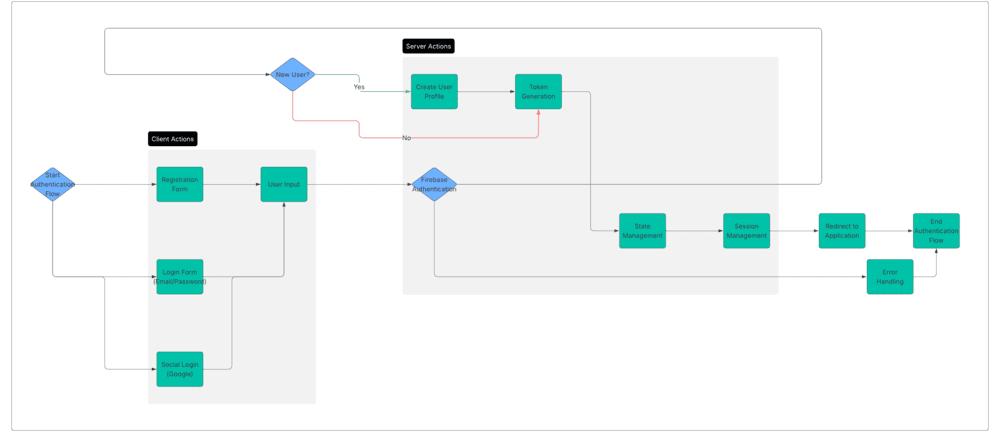
- Registration: New users create accounts with email/password or social providers
- Login: Returning users authenticate with their credentials
- Session Management: Firebase maintains the authenticated state
- Profile Creation: New users get a profile in the database upon registration
- Authorization: Access to features is controlled based on authentication state
Implementation
The authentication system is implemented using React Context API to provide application-wide authentication state.
AuthContext Provider
The AuthContext.jsx file encapsulates all authentication functionality:
// src/contexts/AuthContext.jsx
import { createContext, useContext, useState, useEffect } from 'react';
import {
  createUserWithEmailAndPassword,
  signInWithEmailAndPassword,
  signOut,
  updateProfile,
  sendPasswordResetEmail,
  onAuthStateChanged,
  GoogleAuthProvider,
  signInWithPopup
} from 'firebase/auth';
import { ref, set, get } from 'firebase/database';
import { auth, db } from '../config/firebase';

// Create context
const AuthContext = createContext();

// Context provider component
export function AuthProvider({ children }) {
  const [user, setUser] = useState(null);
  const [loading, setLoading] = useState(true);
  const [error, setError] = useState(null);

  // Listen for authentication state changes
  useEffect(() => {
    const unsubscribe = onAuthStateChanged(auth, async (authUser) => {
      if (authUser) {
        // User is signed in, fetch additional profile data
        try {
          const userRef = ref(db, `users/${authUser.uid}`);
          const snapshot = await get(userRef);

          if (snapshot.exists()) {
            // Combine auth user data with profile data
            setUser({
              ...authUser,
              profile: snapshot.val()
            });
          } else {
            // Just use auth data if no profile exists
            setUser(authUser);
          }
        } catch (err) {
          console.error("Error fetching user profile:", err);
          setUser(authUser);
        }
      } else {
        // User is signed out
        setUser(null);
      }
      setLoading(false);
    });

    // Cleanup subscription
    return unsubscribe;
  }, []);

  // Register with email/password
  const signup = async (email, password, displayName) => {
    try {
      setError(null);
      // Create auth account
      const userCredential = await createUserWithEmailAndPassword(auth, email, password);

      // Update profile with display name
      await updateProfile(userCredential.user, { displayName });

      // Create user profile in database
      await set(ref(db, `users/${userCredential.user.uid}`), {
        displayName,
        email,
        photoURL: null,
        createdAt: Date.now(),
        lastActive: Date.now(),
        status: 'online',
      });

      return userCredential.user;
    } catch (err) {
      setError(err.message);
      throw err;
    }
  };

  // Login with email/password
  const login = async (email, password) => {
    try {
      setError(null);
      const userCredential = await signInWithEmailAndPassword(auth, email, password);

      // Update last active status
      await set(ref(db, `users/${userCredential.user.uid}/lastActive`), Date.now());
      await set(ref(db, `users/${userCredential.user.uid}/status`), 'online');

      return userCredential.user;
    } catch (err) {
      setError(err.message);
      throw err;
    }
  };

  // Google sign-in
  const signInWithGoogle = async () => {
    try {
      setError(null);
      const provider = new GoogleAuthProvider();
      const userCredential = await signInWithPopup(auth, provider);

      // Check if user exists in database
      const userRef = ref(db, `users/${userCredential.user.uid}`);
      const snapshot = await get(userRef);

      if (!snapshot.exists()) {
        // Create user profile if it doesn't exist
        await set(userRef, {
          displayName: userCredential.user.displayName,
          email: userCredential.user.email,
          photoURL: userCredential.user.photoURL,
          createdAt: Date.now(),
          lastActive: Date.now(),
          status: 'online',
        });
      } else {
        // Update last active status
        await set(ref(db, `users/${userCredential.user.uid}/lastActive`), Date.now());
        await set(ref(db, `users/${userCredential.user.uid}/status`), 'online');
      }

      return userCredential.user;
    } catch (err) {
      setError(err.message);
      throw err;
    }
  };

  // Logout
  const logout = async () => {
    try {
      setError(null);

      // Update user status before logging out
      if (user?.uid) {
        await set(ref(db, `users/${user.uid}/status`), 'offline');
        await set(ref(db, `users/${user.uid}/lastActive`), Date.now());
      }

      await signOut(auth);
    } catch (err) {
      setError(err.message);
      throw err;
    }
  };

  // Reset password
  const resetPassword = async (email) => {
    try {
      setError(null);
      await sendPasswordResetEmail(auth, email);
    } catch (err) {
      setError(err.message);
      throw err;
    }
  };

  // Update user profile
  const updateUserProfile = async (data) => {
    try {
      setError(null);

      if (!user) throw new Error('No authenticated user');

      // Update auth profile if display name or photo URL is provided
      if (data.displayName || data.photoURL) {
        await updateProfile(auth.currentUser, {
          displayName: data.displayName || user.displayName,
          photoURL: data.photoURL || user.photoURL
        });
      }

      // Update database profile
      const updates = {};
      Object.keys(data).forEach(key => {
        updates[`users/${user.uid}/${key}`] = data[key];
      });

      await set(ref(db), updates);

      // Refresh user object
      const userRef = ref(db, `users/${user.uid}`);
      const snapshot = await get(userRef);

      if (snapshot.exists()) {
        setUser({
          ...auth.currentUser,
          profile: snapshot.val()
        });
      }
    } catch (err) {
      setError(err.message);
      throw err;
    }
  };

  // Context value
  const value = {
    user,
    loading,
    error,
    signup,
    login,
    signInWithGoogle,
    logout,
    resetPassword,
    updateUserProfile
  };

  return (
    <AuthContext.Provider value={value}>
      {!loading && children}
    </AuthContext.Provider>
  );
}

// Custom hook to use the auth context
export function useAuth() {
  return useContext(AuthContext);
}
Using the Auth Context
Components can access authentication state and functions using the useAuth hook:
import { useAuth } from '../contexts/AuthContext';

function ProfileComponent() {
  const { user, updateUserProfile, logout } = useAuth();

  // Component logic using auth functionality
  // ...
}
Authentication UI Components
The application includes several UI components for authentication:
Login Form
// src/components/auth/LoginForm.jsx
import { useState } from 'react';
import { useAuth } from '../../contexts/AuthContext';
import styles from './LoginForm.module.css';

export default function LoginForm() {
  const [email, setEmail] = useState('');
  const [password, setPassword] = useState('');
  const [isLoading, setIsLoading] = useState(false);
  const [error, setError] = useState('');

  const { login, signInWithGoogle } = useAuth();

  const handleSubmit = async (e) => {
    e.preventDefault();
    setError('');

    if (!email || !password) {
      setError('Please fill in all fields');
      return;
    }

    try {
      setIsLoading(true);
      await login(email, password);
      // Successful login is handled by the auth state change
    } catch (err) {
      setError(err.message || 'Failed to sign in');
    } finally {
      setIsLoading(false);
    }
  };

  const handleGoogleSignIn = async () => {
    try {
      setIsLoading(true);
      await signInWithGoogle();
      // Successful login is handled by the auth state change
    } catch (err) {
      setError(err.message || 'Failed to sign in with Google');
    } finally {
      setIsLoading(false);
    }
  };

  return (
    <div className={styles.formContainer}>
      <h2>Sign In</h2>

      {error && <div className={styles.error}>{error}</div>}

      <form onSubmit={handleSubmit}>
        <div className={styles.formGroup}>
          <label htmlFor="email">Email</label>
          <input
            type="email"
            id="email"
            value={email}
            onChange={(e) => setEmail(e.target.value)}
            disabled={isLoading}
            required
          />
        </div>

        <div className={styles.formGroup}>
          <label htmlFor="password">Password</label>
          <input
            type="password"
            id="password"
            value={password}
            onChange={(e) => setPassword(e.target.value)}
            disabled={isLoading}
            required
          />
        </div>

        <button
          type="submit"
          className={styles.submitButton}
          disabled={isLoading}
        >
          {isLoading ? 'Signing in...' : 'Sign In'}
        </button>
      </form>

      <div className={styles.divider}>or</div>

      <button
        onClick={handleGoogleSignIn}
        className={styles.googleButton}
        disabled={isLoading}
      >
        <img src="/img/google-icon.png" alt="Google" />
        Sign in with Google
      </button>

      <p className={styles.switchForm}>
        Don't have an account? <a href="/signup">Sign Up</a>
      </p>
    </div>
  );
}
User Profile
// src/components/profile/UserProfile.jsx
import { useState } from 'react';
import { useAuth } from '../../contexts/AuthContext';
import styles from './UserProfile.module.css';

export default function UserProfile() {
  const { user, updateUserProfile } = useAuth();

  const [displayName, setDisplayName] = useState(user?.displayName || '');
  const [isEditing, setIsEditing] = useState(false);
  const [isLoading, setIsLoading] = useState(false);
  const [error, setError] = useState('');

  const handleSubmit = async (e) => {
    e.preventDefault();
    setError('');

    if (!displayName.trim()) {
      setError('Display name cannot be empty');
      return;
    }

    try {
      setIsLoading(true);
      await updateUserProfile({ displayName });
      setIsEditing(false);
    } catch (err) {
      setError(err.message || 'Failed to update profile');
    } finally {
      setIsLoading(false);
    }
  };

  return (
    <div className={styles.profileContainer}>
      <div className={styles.profileHeader}>
        <h2>Your Profile</h2>
        {!isEditing && (
          <button
            onClick={() => setIsEditing(true)}
            className={styles.editButton}
          >
            Edit Profile
          </button>
        )}
      </div>

      {error && <div className={styles.error}>{error}</div>}

      {isEditing ? (
        <form onSubmit={handleSubmit}>
          <div className={styles.formGroup}>
            <label htmlFor="displayName">Display Name</label>
            <input
              type="text"
              id="displayName"
              value={displayName}
              onChange={(e) => setDisplayName(e.target.value)}
              disabled={isLoading}
              required
            />
          </div>

          <div className={styles.formActions}>
            <button
              type="submit"
              className={styles.saveButton}
              disabled={isLoading}
            >
              {isLoading ? 'Saving...' : 'Save Changes'}
            </button>

            <button
              type="button"
              onClick={() => {
                setIsEditing(false);
                setDisplayName(user?.displayName || '');
                setError('');
              }}
              className={styles.cancelButton}
              disabled={isLoading}
            >
              Cancel
            </button>
          </div>
        </form>
      ) : (
        <div className={styles.profileInfo}>
          <div className={styles.profileAvatar}>
            {user?.photoURL ? (
              <img src={user.photoURL} alt={user.displayName} />
            ) : (
              <div className={styles.avatarPlaceholder}>
                {user?.displayName?.charAt(0) || '?'}
              </div>
            )}
          </div>

          <div className={styles.profileDetails}>
            <h3>{user?.displayName}</h3>
            <p>{user?.email}</p>
            <p>Account created: {new Date(user?.profile?.createdAt).toLocaleDateString()}</p>
          </div>
        </div>
      )}
    </div>
  );
}
Authentication Guards
The application includes route guards to protect authenticated-only routes:
// src/components/auth/ProtectedRoute.jsx
import { Navigate } from 'react-router-dom';
import { useAuth } from '../../contexts/AuthContext';

export default function ProtectedRoute({ children }) {
  const { user, loading } = useAuth();

  // Show loading state while checking authentication
  if (loading) {
    return <div>Loading...</div>;
  }

  // Redirect to login if not authenticated
  if (!user) {
    return <Navigate to="/login" />;
  }

  // Render children if authenticated
  return children;
}
User Status Management
The application tracks user online status:
- Online Status: Updated when user logs in or becomes active
- Offline Status: Set when user logs out or closes the application
- Last Active: Timestamp of the user's last activity
// Update status on window events
useEffect(() => {
  if (!user?.uid) return;

  const updateOnlineStatus = async () => {
    await set(ref(db, `users/${user.uid}/status`), 'online');
    await set(ref(db, `users/${user.uid}/lastActive`), Date.now());
  };

  const updateOfflineStatus = async () => {
    await set(ref(db, `users/${user.uid}/status`), 'offline');
    await set(ref(db, `users/${user.uid}/lastActive`), Date.now());
  };

  window.addEventListener('focus', updateOnlineStatus);
  window.addEventListener('online', updateOnlineStatus);
  window.addEventListener('beforeunload', updateOfflineStatus);

  return () => {
    window.removeEventListener('focus', updateOnlineStatus);
    window.removeEventListener('online', updateOnlineStatus);
    window.removeEventListener('beforeunload', updateOfflineStatus);
  };
}, [user]);
Security Considerations
The authentication system includes several security features:
- Secure Credential Storage: Firebase handles secure credential storage
- Session Persistence: Sessions can persist across page reloads
- Auth State Monitoring: Real-time monitoring of authentication state
- Database Security Rules: Firebase rules restrict data access based on authentication
- Password Reset: Secure password reset functionality
Customization Options
The authentication system can be customized in several ways:
- Additional Auth Providers: Add support for GitHub, Facebook, Twitter, etc.
- Custom Claims: Add user roles and permissions using Firebase custom claims
- Enhanced Profile Data: Extend user profiles with additional fields
- Multi-Factor Authentication: Add 2FA support for enhanced security
- Custom Email Templates: Customize email verification and password reset emails
Troubleshooting
Common authentication issues and solutions:
- Login Failures: Check credentials, ensure email is verified if required
- Token Expiration: Handle token refresh with Firebase's built-in mechanisms
- Account Linking: Manage multiple authentication methods for the same user
- Database Access: Ensure security rules are properly configured for authenticated users
- Session Persistence: Configure appropriate persistence level based on application needs
Installation Guide
- Go to Authentication > Sign-in method
- Enable Email/Password authentication
- Optionally, enable other authentication methods like Google or GitHub