DirectMessagePanel Component
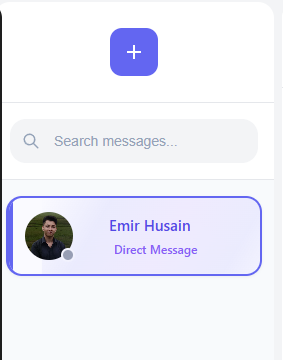
The DirectMessagePanel is the right sidebar that appears when you're chatting with someone 1-on-1. I created this to give users quick access to important information about who they're talking to.
What It Does
The DirectMessagePanel shows:
- User profile picture
- User display name
- Online status
- User bio/description
- Block/unblock controls
- Last seen timestamp
Implementation
I structured this component to be simple but informative:
// src/components/panels/DirectMessagePanel.jsx
import { useState, useEffect } from 'react';
import { useAuth } from '../../contexts/AuthContext';
import { useChat } from '../../contexts/ChatContext';
import Avatar from '../common/Avatar';
import OnlineStatus from '../common/OnlineStatus';
import styles from './DirectMessagePanel.module.css';

export default function DirectMessagePanel({ chatId }) {
  // State
  const [otherUser, setOtherUser] = useState(null);
  const [isBlocked, setIsBlocked] = useState(false);
  const [isBlockedBy, setIsBlockedBy] = useState(false);

  // Context
  const { user } = useAuth();
  const {
    allUsers,
    currentChat,
    blockUser,
    unblockUser,
    isUserBlocked
  } = useChat();

  // Find the other user in this chat
  useEffect(() => {
    if (!currentChat || !user?.uid || !allUsers) return;

    // For private chats, find the other participant
    if (currentChat.type === 'private') {
      const participantIds = Object.keys(currentChat.participants || {});
      const otherUserId = participantIds.find(id => id !== user.uid);

      if (otherUserId && allUsers[otherUserId]) {
        setOtherUser(allUsers[otherUserId]);

        // Check if this user is blocked
        const blocked = isUserBlocked(otherUserId);
        setIsBlocked(blocked);

        // Check if current user is blocked by other user
        const blockedBy = allUsers[otherUserId]?.blockedUsers?.[user.uid] === true;
        setIsBlockedBy(blockedBy);
      }
    }
  }, [currentChat, user, allUsers, isUserBlocked]);

  // Handle blocking/unblocking user
  const handleBlockToggle = async () => {
    if (!otherUser) return;

    try {
      if (isBlocked) {
        // Unblock the user
        await unblockUser(otherUser.uid);
        setIsBlocked(false);
      } else {
        // Block the user
        await blockUser(otherUser.uid);
        setIsBlocked(true);
      }
    } catch (error) {
      console.error('Error toggling block status:', error);
    }
  };

  // Format last seen time
  const formatLastSeen = (timestamp) => {
    if (!timestamp) return 'Unknown';

    const date = new Date(timestamp);
    const now = new Date();
    const diffInMs = now - date;
    const diffInHours = diffInMs / (1000 * 60 * 60);

    if (diffInHours < 24) {
      return `Today at ${date.toLocaleTimeString([], { hour: '2-digit', minute: '2-digit' })}`;
    } else if (diffInHours < 48) {
      return `Yesterday at ${date.toLocaleTimeString([], { hour: '2-digit', minute: '2-digit' })}`;
    } else {
      return date.toLocaleDateString();
    }
  };

  // If no other user found
  if (!otherUser) {
    return (
      <div className={styles.directMessagePanel}>
        <div className={styles.emptyState}>
          No user information available
        </div>
      </div>
    );
  }

  return (
    <div className={styles.directMessagePanel}>
      <div className={styles.userHeader}>
        <Avatar
          src={otherUser.photoURL}
          alt={otherUser.displayName}
          size="large"
        />

        <h2 className={styles.userName}>{otherUser.displayName}</h2>

        <OnlineStatus
          isOnline={otherUser.isOnline}
          lastSeen={otherUser.lastSeen}
        />
      </div>

      <div className={styles.userInfo}>
        <div className={styles.infoItem}>
          <span className={styles.label}>Email:</span>
          <span className={styles.value}>{otherUser.email}</span>
        </div>

        {otherUser.bio && (
          <div className={styles.infoItem}>
            <span className={styles.label}>Bio:</span>
            <span className={styles.value}>{otherUser.bio}</span>
          </div>
        )}

        <div className={styles.infoItem}>
          <span className={styles.label}>Last seen:</span>
          <span className={styles.value}>
            {otherUser.isOnline ? 'Online now' : formatLastSeen(otherUser.lastSeen)}
          </span>
        </div>
      </div>

      <div className={styles.actions}>
        <button
          className={`${styles.blockButton} ${isBlocked ? styles.unblockButton : ''}`}
          onClick={handleBlockToggle}
        >
          {isBlocked ? 'Unblock User' : 'Block User'}
        </button>
      </div>

      {isBlockedBy && (
        <div className={styles.blockedBanner}>
          This user has blocked you. You cannot send them messages.
        </div>
      )}
    </div>
  );
}
The User Blocking Feature
One of the most important features in this panel is the ability to block users. I implemented this with a simple toggle button that calls the block/unblock functions from the ChatContext:
const handleBlockToggle = async () => {
  if (!otherUser) return;

  try {
    if (isBlocked) {
      // Unblock the user
      await unblockUser(otherUser.uid);
      setIsBlocked(false);
    } else {
      // Block the user
      await blockUser(otherUser.uid);
      setIsBlocked(true);
    }
  } catch (error) {
    console.error('Error toggling block status:', error);
  }
};
When a user is blocked, several things happen:
- The blocker can't receive messages from the blocked user
- The blocked user can't send messages to the blocker
- The UI shows appropriate indicators to both users
User Experience Considerations
I wanted to make this panel helpful without being overwhelming, so I focused on:
- Clean Layout: Information is grouped logically
- Visual Hierarchy: The most important info (name, photo, status) is most prominent
- Action Clarity: Block/unblock button changes text and color to make its function clear
- Context Awareness: Shows different UI states depending on blocking status
Useful Tips
From my experience developing this component:
- Performance: Be mindful of data fetching - avoid expensive operations in this panel
- Clear Feedback: Always provide clear feedback for user actions like blocking
- Privacy: Careful about what information is shown about other users
- Error Handling: Add robust error handling for failed requests