Firebase Data Model
This document outlines the data structure used in the Firebase Realtime Database for the chat application, explaining how data is organized and relationships are maintained.
Database Structure Overview
The chat application uses Firebase Realtime Database to store and synchronize data in real-time. The data is organized hierarchically in a JSON-like structure.
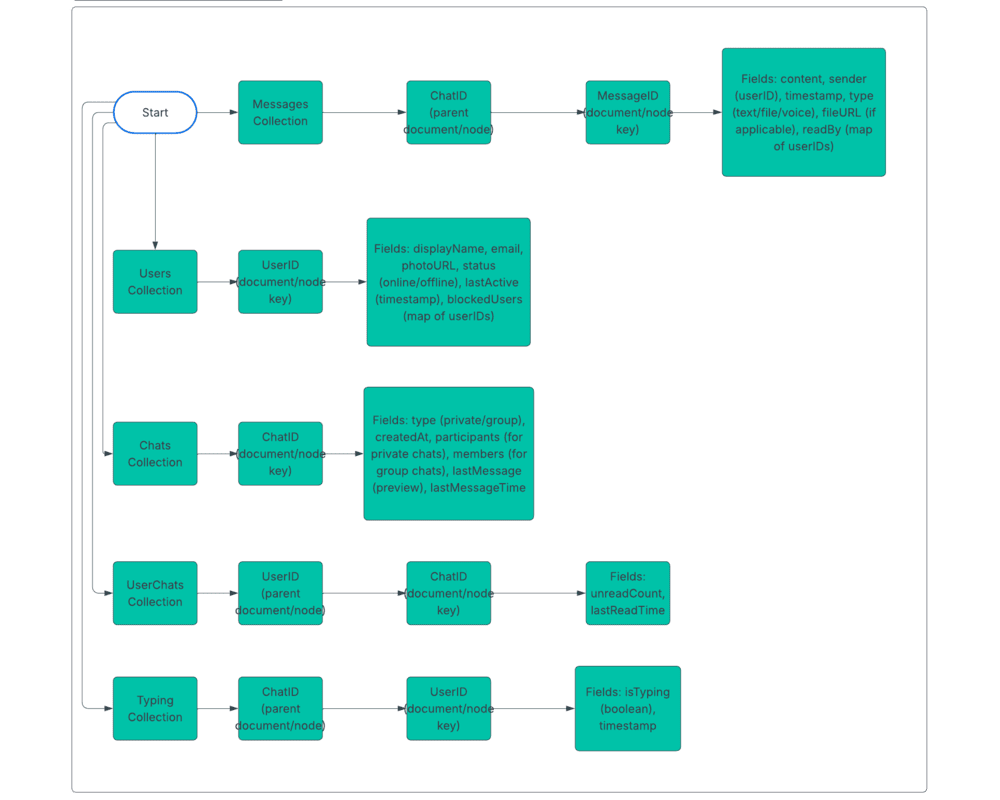
Main Data Collections
The database is structured with these primary collections:
firebase-database/
├── users/                  # User profiles and metadata
├── chats/                  # Chat conversation metadata
├── messages/               # Chat messages
├── userChats/              # User-chat relationships
├── typing/                 # Typing indicators
└── presence/               # User online status
Users Collection
The users collection stores user profiles and related information:
"users": {
  "userId1": {
    "displayName": "John Doe",
    "email": "john@example.com",
    "photoURL": "https://example.com/photos/john.jpg",
    "createdAt": 1642527812354,
    "lastActive": 1642789436781,
    "status": "online",
    "blockedUsers": {
      "userId3": true,
      "userId7": true
    },
    "preferences": {
      "notifications": {
        "browserNotifications": true,
        "soundEnabled": true,
        "mentionAlerts": true
      },
      "theme": "dark"
    }
  },
  "userId2": {
    // User 2 data
  }
}
User Object Properties
| Property | Type | Description |
|---|---|---|
displayName | string | User's display name |
email | string | User's email address |
photoURL | string | URL to user's profile picture |
createdAt | number | Timestamp when user was created |
lastActive | number | Timestamp of last user activity |
status | string | Current user status: "online", "offline", "away" |
blockedUsers | object | Map of blocked user IDs to boolean |
preferences | object | User preferences for app settings |
Chats Collection
The chats collection stores metadata about chat conversations:
"chats": {
  "chatId1": {
    "type": "private",
    "createdAt": 1642527892354,
    "lastMessageTime": 1642789436781,
    "participants": {
      "userId1": true,
      "userId2": true
    },
    "lastMessage": {
      "content": "Hello there!",
      "sender": "userId1",
      "timestamp": 1642789436781,
      "type": null
    }
  },
  "chatId2": {
    "type": "group",
    "name": "Project Team",
    "createdBy": "userId1",
    "createdAt": 1642525692354,
    "lastMessageTime": 1642788436781,
    "photoURL": "https://example.com/groups/project-team.jpg",
    "description": "Team chat for the new project",
    "members": {
      "userId1": {
        "role": "admin",
        "joinedAt": 1642525692354
      },
      "userId2": {
        "role": "member",
        "joinedAt": 1642525812354
      },
      "userId3": {
        "role": "member",
        "joinedAt": 1642526912354
      }
    },
    "lastMessage": {
      "content": "Meeting tomorrow at 10",
      "sender": "userId3",
      "timestamp": 1642788436781,
      "type": null
    }
  }
}
Chat Object Properties
| Property | Type | Description |
|---|---|---|
type | string | Type of chat: "private" or "group" |
createdAt | number | Timestamp when chat was created |
lastMessageTime | number | Timestamp of last message |
participants | object | For private chats: Map of participant user IDs |
members | object | For group chats: Map of member user IDs with roles |
name | string | For group chats: Display name of the group |
photoURL | string | For group chats: Group profile picture URL |
createdBy | string | For group chats: User ID of creator |
description | string | For group chats: Group description |
lastMessage | object | Preview of the last message sent |
Messages Collection
The messages collection stores all chat messages, organized by chat ID:
"messages": {
  "chatId1": {
    "messageId1": {
      "content": "Hello there!",
      "sender": "userId1",
      "timestamp": 1642789436781,
      "readBy": {
        "userId1": 1642789436781,
        "userId2": 1642789496781
      },
      "replyTo": null,
      "edited": false,
      "reactions": {
        "👍": {
          "userId2": true
        }
      }
    },
    "messageId2": {
      "content": "Hi! How are you?",
      "sender": "userId2",
      "timestamp": 1642789536781,
      "readBy": {
        "userId1": 1642789596781,
        "userId2": 1642789536781
      },
      "replyTo": "messageId1",
      "edited": false
    },
    "messageId3": {
      "type": "file",
      "fileName": "document.pdf",
      "fileSize": 2457862,
      "fileURL": "https://storage.example.com/files/document.pdf",
      "fileThumbnail": "https://storage.example.com/thumbnails/document.jpg",
      "sender": "userId1",
      "timestamp": 1642789636781,
      "readBy": {
        "userId1": 1642789636781
      }
    },
    "messageId4": {
      "type": "voice",
      "duration": 12.5,
      "fileURL": "https://storage.example.com/voice/recording.mp3",
      "sender": "userId2",
      "timestamp": 1642789736781,
      "readBy": {
        "userId2": 1642789736781
      }
    }
  },
  "chatId2": {
    // Messages for chat 2
  }
}
Message Object Properties
| Property | Type | Description |
|---|---|---|
content | string | Message text content (for text messages) |
sender | string | User ID of message sender |
timestamp | number | Timestamp when message was sent |
readBy | object | Map of user IDs to timestamp when they read the message |
replyTo | string | ID of message being replied to (null if not a reply) |
edited | boolean | Whether message has been edited |
reactions | object | Map of emoji reactions to user IDs |
type | string | Message type: null (text), "file", "voice", etc. |
fileName | string | For file messages: Original filename |
fileSize | number | For file messages: File size in bytes |
fileURL | string | For file/voice messages: URL to stored file |
fileThumbnail | string | For image file messages: URL to thumbnail |
duration | number | For voice messages: Duration in seconds |
deleted | boolean | Whether message has been deleted |
UserChats Collection
The userChats collection maintains a record of which chats a user belongs to:
"userChats": {
  "userId1": {
    "chatId1": {
      "unreadCount": 0,
      "lastReadTime": 1642789596781,
      "pinned": true
    },
    "chatId2": {
      "unreadCount": 5,
      "lastReadTime": 1642785436781,
      "pinned": false
    }
  },
  "userId2": {
    // Chats for user 2
  }
}
This structure provides a quick way to:
- Retrieve all chats for a specific user
- Track unread message counts
- Maintain user-specific chat settings like pinned status
UserChat Object Properties
| Property | Type | Description |
|---|---|---|
unreadCount | number | Number of unread messages |
lastReadTime | number | Timestamp when user last read the chat |
pinned | boolean | Whether the chat is pinned by the user |
muted | boolean | Whether notifications are muted for this chat |
Typing Indicators
The typing collection stores real-time typing indicators:
"typing": {
  "chatId1": {
    "userId1": {
      "isTyping": false,
      "timestamp": 1642789836781
    },
    "userId2": {
      "isTyping": true,
      "timestamp": 1642789896781
    }
  }
}
Typing Object Properties
| Property | Type | Description |
|---|---|---|
isTyping | boolean | Whether user is currently typing |
timestamp | number | Timestamp of last typing status update |
Presence System
The presence collection maintains user online status:
"presence": {
  "userId1": {
    "online": true,
    "lastChanged": 1642789936781
  },
  "userId2": {
    "online": false,
    "lastChanged": 1642788936781
  }
}
Firebase's built-in presence system is also utilized for more reliable online status tracking.
Data Relationships
User and Chat Relationships
- Direct Messages: Two users share a private chat
- Group Chats: Multiple users share a group chat with roles
- Blocking: One-way relationship where a user blocks another
Message Relationships
- Reply Chains: Messages can reference other messages
- Reactions: Users can react to messages
- Read Status: Tracking which users have read which messages
Security Rules
Firebase security rules control access to the data based on user authentication and relationships. Here's a simplified example of the rules:
{
  "rules": {
    "users": {
      "$userId": {
        // Users can read all user profiles
        ".read": "auth !== null",
        // Users can write only to their own profile
        ".write": "auth !== null && auth.uid === $userId"
      }
    },
    "chats": {
      "$chatId": {
        // Users can read chats they participate in
        ".read": "auth !== null && root.child('chats').child($chatId).child('participants').child(auth.uid).exists() ||
                 root.child('chats').child($chatId).child('members').child(auth.uid).exists()",
        // Similar write rules with additional checks for group admin actions
      }
    },
    "messages": {
      "$chatId": {
        // Users can read messages from chats they participate in
        ".read": "auth !== null && root.child('chats').child($chatId).child('participants').child(auth.uid).exists() ||
                 root.child('chats').child($chatId).child('members').child(auth.uid).exists()",
        "$messageId": {
          // Users can create messages in chats they participate in
          ".write": "auth !== null &&
                    (root.child('chats').child($chatId).child('participants').child(auth.uid).exists() ||
                     root.child('chats').child($chatId).child('members').child(auth.uid).exists()) &&
                    // Prevent writing if blocked
                    !root.child('users').child(data.child('sender').val()).child('blockedUsers').child(auth.uid).exists()"
        }
      }
    }
  }
}
Data Consistency and Integrity
To maintain data consistency and integrity, the application follows these practices:
- Transactions: Using Firebase transactions for operations that need atomic updates
- Denormalization: Storing redundant data in multiple places for performance
- Validation: Validating data on both client and server (via security rules)
- Offline Support: Handling offline/online synchronization gracefully
- Cleanup Functions: Using Firebase Cloud Functions for cleanup tasks and maintaining consistency
Optimization Techniques
Several optimization techniques are used to improve performance:
- Pagination: Loading messages in batches using
startAt,endAt, andlimitToLast - Shallow Queries: Using
.shallow()to retrieve only keys when full objects aren't needed - Indexing: Creating proper Firebase indexes for common queries
- Data Segmentation: Breaking large data sets into manageable chunks
- Caching: Leveraging Firebase's built-in caching mechanisms
Example Queries
Here are some common query patterns used in the application:
Get a User's Chats
// Get all chats for a user
const userChatsRef = ref(db, `userChats/${userId}`);
onValue(userChatsRef, (snapshot) => {
  const userChats = snapshot.val() || {};

  // Process user chats
  const chatsArray = Object.entries(userChats).map(([chatId, chatData]) => ({
    id: chatId,
    ...chatData
  }));
});
Get Chat Messages with Pagination
// Get last 20 messages for a chat
const messagesRef = ref(db, `messages/${chatId}`);
const messagesQuery = query(messagesRef, orderByChild('timestamp'), limitToLast(20));

onValue(messagesQuery, (snapshot) => {
  const messages = [];
  snapshot.forEach((childSnapshot) => {
    messages.push({
      id: childSnapshot.key,
      ...childSnapshot.val()
    });
  });

  // Sort messages by timestamp
  messages.sort((a, b) => a.timestamp - b.timestamp);
});
Check if User Is Blocked
// Check if user2 has blocked user1
const blockedRef = ref(db, `users/${user2Id}/blockedUsers/${user1Id}`);
get(blockedRef).then((snapshot) => {
  const isBlocked = snapshot.exists() && snapshot.val() === true;

  if (isBlocked) {
    console.log("User is blocked");
  } else {
    console.log("User is not blocked");
  }
});
Best Practices
When working with the Firebase data model, follow these best practices:
- Flatten Data: Avoid deeply nested data structures
- Listen Efficiently: Add and remove listeners as needed to prevent memory leaks
- Batch Operations: Use batch writes for multi-location updates
- Error Handling: Implement robust error handling for database operations
- Security First: Always consider security implications of data structure choices
Migration and Versioning
As the application evolves, the data model may need to change. The following approaches are used for data migration:
- Version Tracking: Including version fields in data objects
- Incremental Updates: Migrating data incrementally as users access it
- Background Jobs: Using Firebase Cloud Functions for bulk migrations
- Backward Compatibility: Maintaining support for older data structures during transitions